How Latorium works
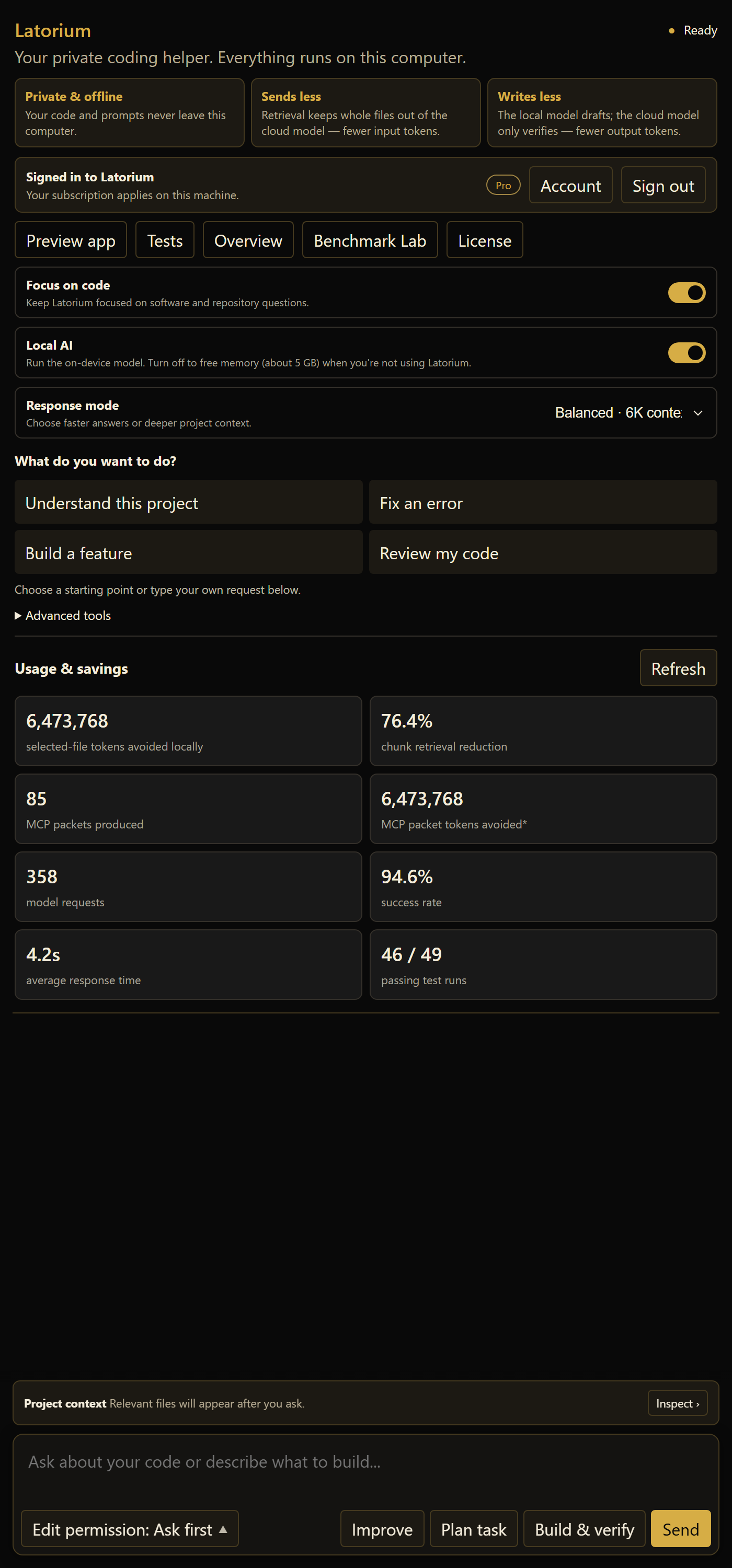
Latorium runs as an MCP server beside your coding agent. When the agent asks for repository context, Latorium searches locally and returns a focused packet. For smaller jobs, Local Coder can draft the work on your machine.
Start with the request you already have
Tell Claude Code or Codex what you want: “add dark mode”, “fix this login error”, or “make the button save my form”. You do not need to know where the relevant files are.
- You ask normally. Keep using the coding agent you already use.
- Latorium finds the useful code. It searches on your computer and picks the pieces related to your request.
- Your agent gets a focused packet. It receives the relevant code, file names, and connections.
- The agent makes the change. Latorium can flag risky files and suggest what to test.
- You can see what happened. The dashboards show what was chosen and how much context was avoided.
MCP is the connection between the agent and Latorium. Set it up once; you do not need to type MCP commands yourself.
Latorium finds the relevant code first
Your agent asks Latorium for the parts of the workspace related to the current job.
local_search returns matching excerpts from the workspace.
context_packet builds a brief with a fixed size limit. Both return relevant passages
with their file paths.
Each call takes an agent argument, so the dashboard can attribute what it avoided
to the agent that asked. Unidentified calls appear in a separate total.
Advanced tool reference
| Name | Plain-English job | Example |
|---|---|---|
local_search |
Find the right code without opening every file. | Where is checkout calculated? |
context_packet |
Make one compact cheat sheet for a task. | Everything relevant to adding coupons. |
context_review |
Catch an old copy of a file. | Replace yesterday's auth code. |
impact_of_change |
Show what might break before editing. | This type is used by four services and two tests. |
local_coder_draft |
Give routine writing to Local Coder. | Draft boilerplate or tests for review. |
create_task / claim_task |
Split work without agents colliding. | One owns the UI; another owns the API. |
Then it handles smaller jobs locally
For focused work such as summaries, tests, boilerplate, and small refactors,
local_coder_draft can use the model running on your own machine.
This keeps routine work off paid model usage. Local Coder can also run when the network or a provider is unavailable. Results depend on the task and hardware; the benchmark page shows the measurements.
The output is a draft. Nothing is applied without your review, and the extension will not write a file you have not approved.
local_coder_draft(prompt: "unit tests for retry escalation")
  drafted 41 lines locally
  awaiting review, no files written
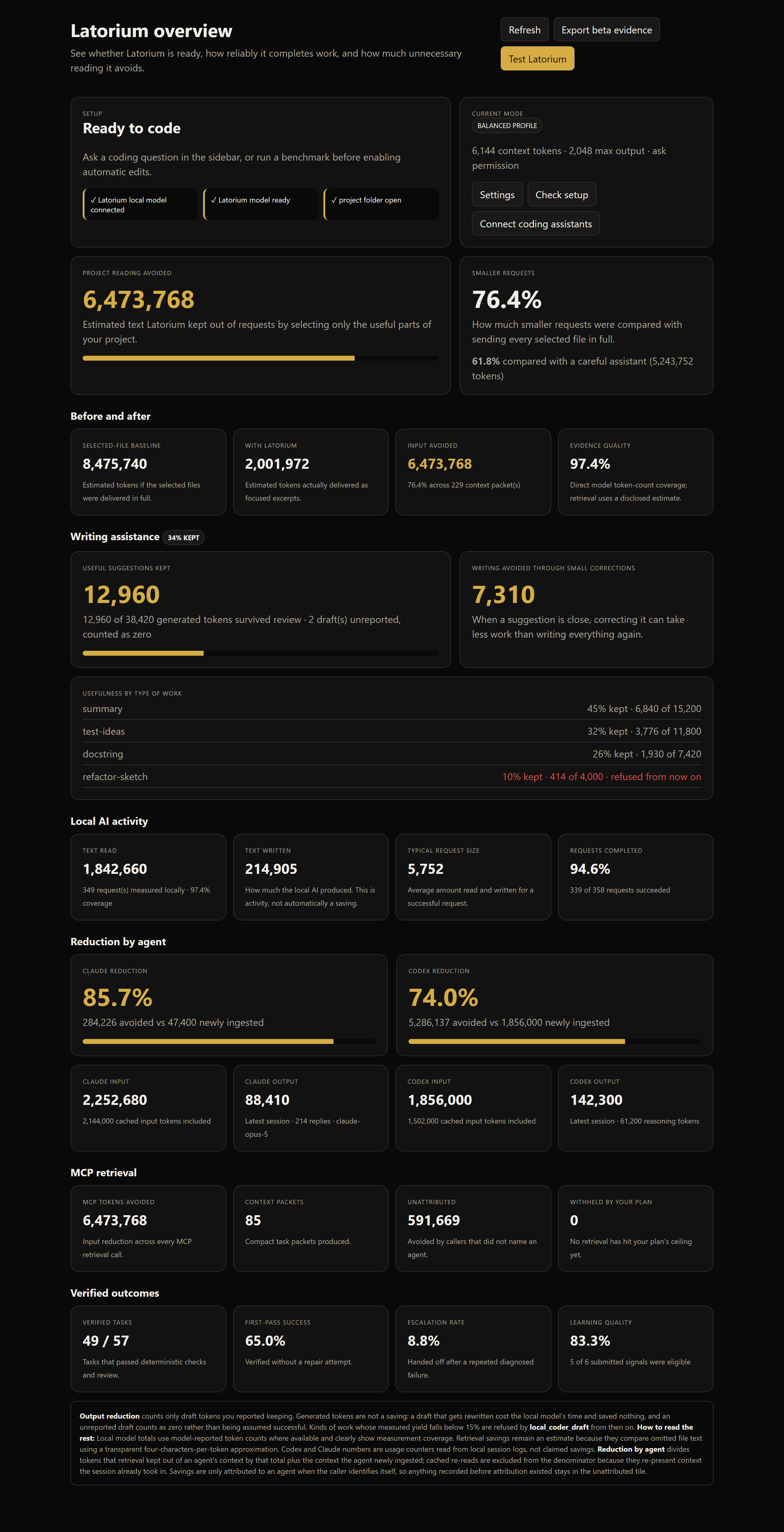
See the context it kept out
Claude and Codex are tracked separately using the token counters already available in their local session logs.
Latorium reads token counters from local session logs. It does not read prompt or response text. Cached input is reported separately from newly read input.
- Claude, newly ingested context
- read from session log
- Codex, newly ingested context
- read from session log
- Attributed to neither
- reported separately
The dashboard starts empty and fills in as Latorium is used on the machine.
Release checks catch problems before customers do
The current development build runs adversarial and benchmark checks against the same retrieval and agent loop used in the extension.
A release must pass the test suite, 20 adversarial scenarios, TypeScript checks, compilation, packaging, secret scanning, and regression checks.
Current development build: 746/747 of Latorium's own tests passed (one skipped, it needs symlink privileges) and 20/20 adversarial checks passed. Checked 19 September 2026.
Questions
Does this replace Claude Code or Codex?
No. Latorium reduces the context your existing agent needs. It handles surrounding mechanical work, while Local Coder can continue with focused tasks after a usage window is spent. Larger jobs may still need a stronger model.
What do I need installed?
VS Code and enough free disk space for Latorium Local Coder. Latorium's guided setup installs the required Local Coder runtime and model for you. Any MCP-capable agent can use the server, not only Claude Code and Codex.
Can I run it air-gapped?
Latorium Local Coder can continue without internet after setup. Only account refresh needs a connection.
What happens when a licence expires?
You drop back to the free tier. Nothing is deleted and nothing is locked. Your task board and saved lessons stay where they are.